
SubAssist
Stop Drowning in Paperwork. Start Running Your Business.
You didn’t get into the trades to manage documents. SubAssist centralizes all your job files, validates pricing on every PO and invoice, and eliminates manual data entry into QuickBooks.
Everything You Need to Manage Jobs and Documents in One Place
SubAssist handles the paperwork nightmare so you don’t have to. Keep all your job documents organized, verify every purchase order and invoice for pricing accuracy, and connect everything to QuickBooks—automatically. No more hunting through emails, no more manual data entry, no more profit leaking away through pricing errors.
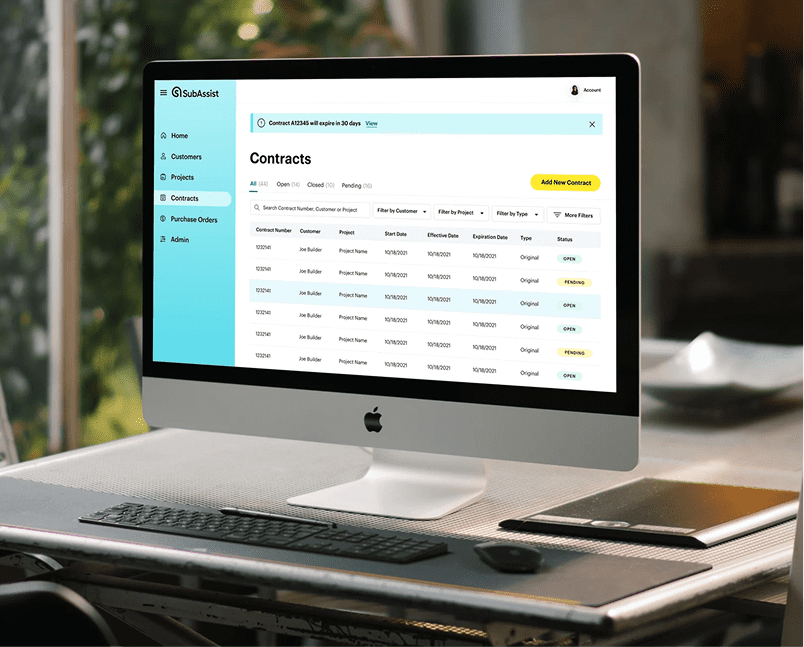
Purchase Order Management
Receive builder POs, verify pricing against your negotiated rates, and automatically import accurate data into QuickBooks. No more manual checking, no more data entry errors.
Invoice Verification
Check every supplier invoice line-by-line against your pricing agreements. Catch overcharges before you pay, then send verified invoices straight to QuickBooks.
Job Document Organization
Keep all your contracts, quotes, change orders, and project files organized by job. Find what you need when you need it - no more digging through email or filing cabinets.
QuickBooks Integration
Eliminate double data entry. SubAssist automatically creates bills and purchase orders in QuickBooks after verifying pricing accuracy.
From Inbox to QuickBooks in Minutes - Not Hours

STEP 1: Receive Documents
Builder sends purchase order or supplier sends invoice via email or builder portal.

STEP 2: Automatic Price Checking
SubAssist reads the document, compares line items against your negotiated pricing, and flags any discrepancies.
STEP 3: Review & Approve
Check flagged errors, approve correct pricing, request credits for overcharges.

STEP 4: QuickBooks Integration
Approved documents automatically create bills or purchase orders in QuickBooks - no manual data entry.
CASE STUDY:
AVI Roofing Protects Margins and Eliminates Costly PO Errors With SubAssist
AVI Roofing operates in large-scale tract communities that can run one to ten years, where pricing changes frequently and POs may continue to be issued using outdated contract pricing. That gap created major margin risk and a heavy manual workload. SubAssist gave AVI a centralized place to manage contract pricing, streamline PO checks, and proactively catch pricing issues before work begins, reducing time spent on manual verification and improving confidence across departments that they are getting paid according to contract.

Who Should Use SubAssist?
General Contractors & Builders
Trying to keep your subcontractors organized and on schedule? SubAssist standardizes how your trade partners manage purchase orders and documents, reducing errors and speeding up the entire supply chain.
Perfect for builders who:
- Work with multiple trade partners across many jobs
- Deal with frequent PO errors and billing disputes
- Want to modernize their supply chain processes
- Need better visibility into subcontractor operations
Key Benefits:
Standardized workflows
All subs using the same system for POs and documentation
Faster turnaround
Automated PO processing means quicker material orders
Improved accuracy
Price verification reduces billing disputes and delays
Better communication
Clear documentation trail for every job
Supply chain efficiency
Connect your trades directly to suppliers
Subcontractors
Managing multiple jobs with scattered paperwork across different builders?SubAssist centralizes all your job documents and purchase orders in one place, verifies pricing automatically, and keeps your QuickBooks accurate without manual data entry.
Perfect for subcontractors who:
- Work with multiple production builders simultaneously
- Process hundreds of POs and invoices monthly
- Waste hours on manual data entry into QuickBooks
- Want to catch pricing errors before they impact profit
Key Benefits:
Document organization
All job files, contracts, and POs in one centralized location
Job tracking
See active projects and associated paperwork at a glance
Price verification
Catch builder PO errors and supplier overcharges automatically
QuickBooks integration
Eliminate manual data entry and reduce accounting errors
Time savings
Turn 40 hours of office work into 2
Vendors & Suppliers
Managing jobs across multiple builders and drowning in scattered paperwork? SubAssist centralizes all your job documents and contracts in one place, so you can find what you need when you need it - without digging through email or filing cabinets.
Perfect for suppliers who:
- Work with multiple builders simultaneously
- Need quick access to contracts and agreements
- Want job documentation connected to QuickBooks
- Spend too much time hunting for paperwork
Key Benefits:
Document organization
All job files, contracts, and POs in one centralized location
Job tracking
See active projects and associated paperwork at a glance
Price verification
Catch builder PO errors and supplier overcharges automatically
QuickBooks integration
Eliminate manual data entry and reduce accounting errors
Time savings
Turn 40 hours of office work into 2
Run Your Business Like a Boss
SubAssist - Document organization, price verification, and QuickBooks integration built specifically for trade contractors.
The Complete Document Automation Solution
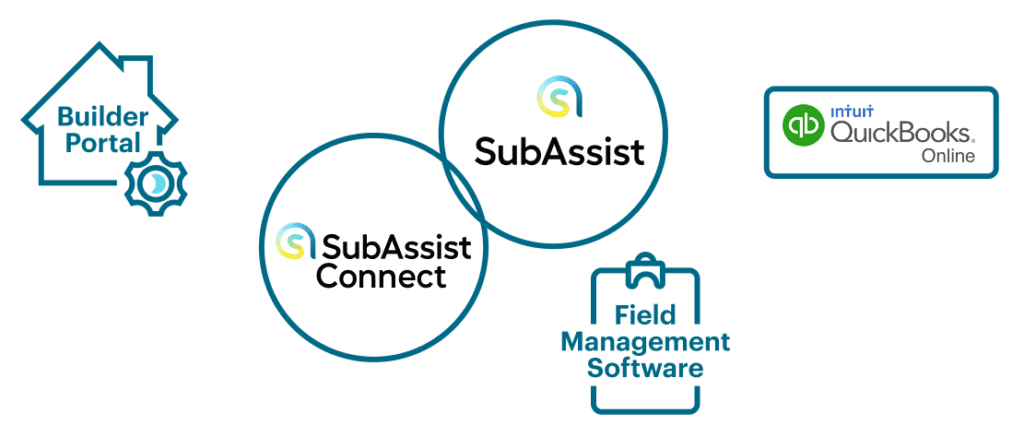
SubAssist + SubAssist Connect
While SubAssist organizes your internal subcontractor paperwork, SubAssist Connect automates the flow of documents from builder portals into your systems. Together, they create a seamless document management ecosystem.
How They Work Together:
SubAssist Connect pulls purchase orders, warranties, and project documents from builder portals, standardizing the data. That information flows into SubAssist where it’s organized alongside your subcontractor documentation. Everything then syncs with QuickBooks for complete financial tracking.
The Result:
No manual data entry. No scattered documents. Complete automation from builder portal to organized files to accurate accounting.
Frequently Asked Questions
No. SubAssist integrates directly with QuickBooks Online or Sage Intact – your existing system of record. If you are using a different accounting software package, please inquire, we can accommodate any system.
Most customers are up and running within a few days. Upload your pricing agreements, connect QuickBooks (optional), and start forwarding documents.
SubAssist currently integrates with QuickBooks Online. For QuickBooks Desktop users, we offer export functionality that allows you to transfer subcontractor information, though it won’t be a real-time sync.
SubAssist flags the discrepancy, shows you the difference, and provides documentation you can send to your builder to request an adjustment to the sales order.
SubAssist works with documents from any source – builder portals, email, direct uploads.
SubAssist processing purchase orders (or work orders) from builder portals and compares them to your contract pricing (bid sheet). You can also upload PDFs, images, scanned documents, or any common file format to use SubAssist as a document storage system. SubAssist can also process supply orders as well as supplier invoices.
Absolutely. While SubAssist is designed primarily for builder contract, purchase order and supply order management, many customers also use it to organize project files, permits, plans, and other documentation. Create custom categories and tags to organize however you need.
SubAssist uses bank-level encryption for data storage and transmission. All documents are stored securely in the cloud with automatic backup. You control access permissions and can track who views or downloads documents.
We offer bulk upload tools and can assist with the initial migration of your existing document library. Many customers start by uploading critical compliance documents first, then add historical records over time.
Absolutely. While SubAssist is designed primarily for builder contract, purchase order and supply order management, many customers also use it to organize project files, permits, plans, and other documentation.
Real Results from Real Trade Contractors
“With the amount of invoices we get daily and the amount of line items on each invoice, it’s virtually impossible to have any one human being, or even a team, checking those. SubAssist catches what we’d miss.”
— Lacey McCormick,
Operations Manager, Fortress Framing
Stop Leaving Money on the Table.
Every day without SubAssist is another day of potential overcharges, wasted time on data entry, and disorganized job files. See how much time and money you could save.
Request a Demo
With a quick 15 minute demo call we’ll show you how you can get organized and start getting things done.